Take control of your communications

Talk, type, share your screen and send files to the people you actually play with. One of you runs the server, everyone else types the address. No accounts, no feed, and the app uses about 40 MB of memory.

Version 1.1.6 for Windows, macOS and Linux.

baucord is a desktop app. Open this page on a Windows, macOS or Linux machine to download it.

baucord during a call: voice channels and users on the left, the shared text chat on the right

What you get

Everything a group of friends needs to hang out, and nothing that needs an account.

Voice that keeps up

Opus with voice activation, tuned for the shortest gap between a word and hearing it. One friend on hotel Wi-Fi doesn't touch anyone else's audio.

Channels

Everyone lands in the Lobby and splits off: a room for the game, one for the movie, an AFK corner. Passwords, limits, and channels you create yourself.

Screen sharing

Your screen and its audio at 720p or 1080p, up to 60 fps. Viewers get a resizable window; a bad connection drops a moment of video, never the voices.

Chat and direct messages

One room for the whole server, plus private conversations that wait for you when you're offline. History comes back when you reconnect.

Files and pictures

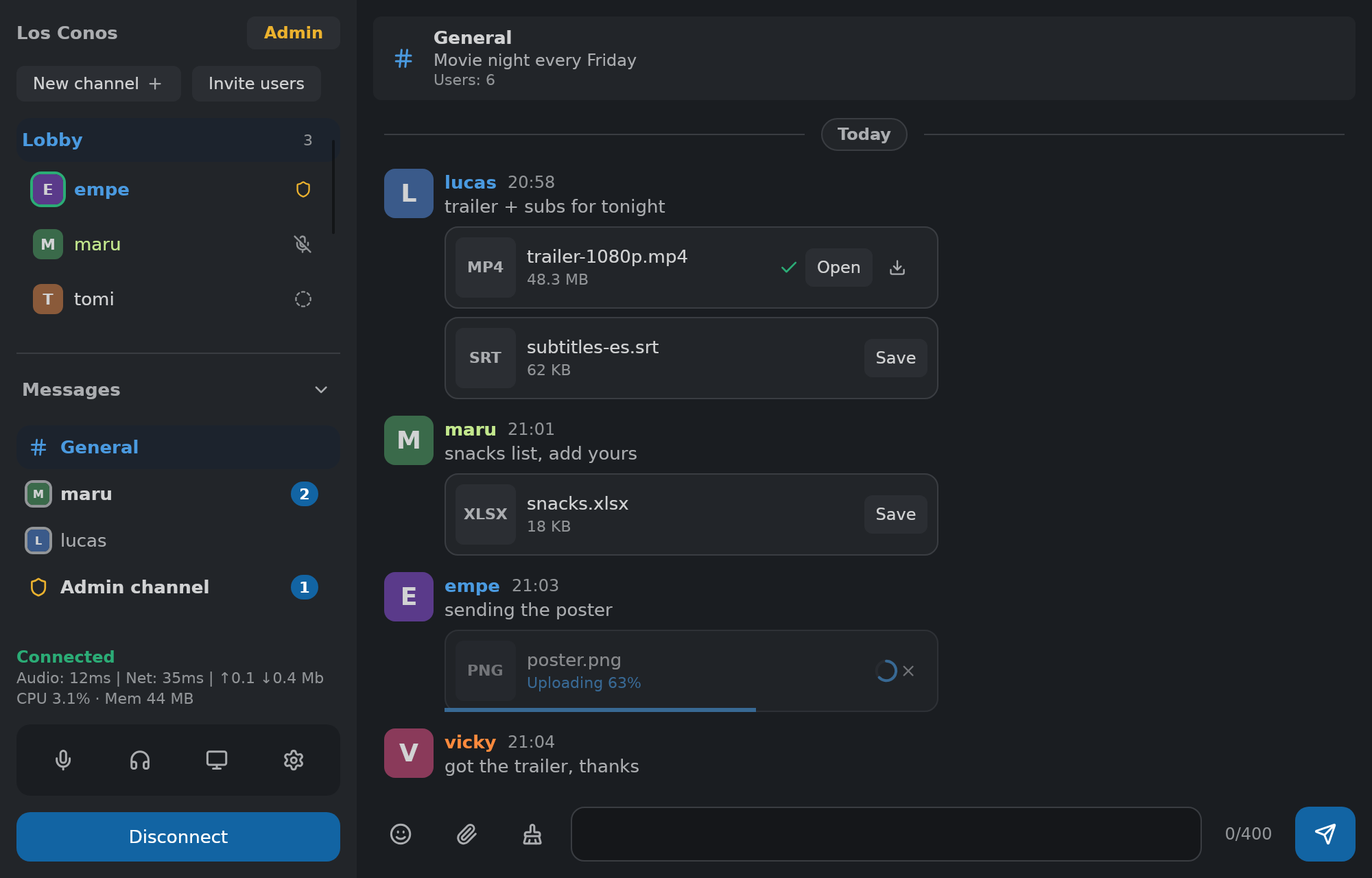
Drop anything into the chat or a DM — pictures show inline, everything else is a card with a progress ring, cancel, and one click to save.

Roles and permissions

Guests, members, organizers, admins — and your own roles, each a named set of permissions with its own badge. Invites grant a role, no accounts anywhere.

Admin panel

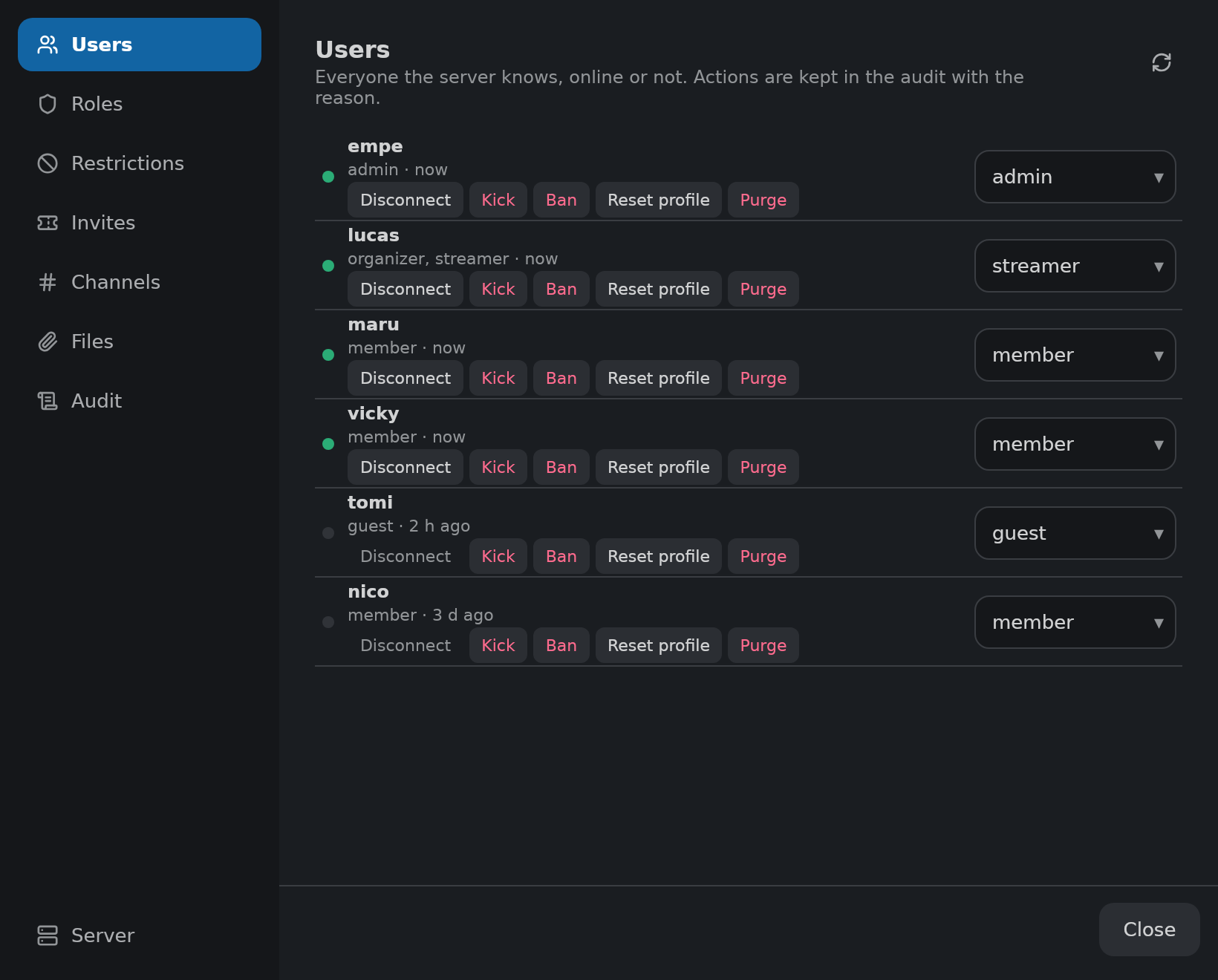
Users, roles, restrictions, invites, channels, files and a readable audit log, in one window. Every action confirms first, and the same commands work from the chat.

Remembers what matters

The server keeps history, direct messages, files and profiles in a single SQLite file. Back it up with one command, restore it with another, or run it in memory and keep nothing.

Per-person volume

Right-click anyone to adjust their volume or mute them. It's remembered for next time.

Hotkeys that don't steal keys

Mute, deafen, share and push to talk from any window. The keys keep working everywhere else.

Private by construction

Every connection is encrypted and your client pins the server's identity. Nothing goes anywhere but the server your friend runs.

Light on your machine

About 40 MB of memory at idle. Closes to the tray and keeps the call going. No installer, no background services.

Screenshots

The whole interface, as it looks on a call.

the chat with file cards: a saved video with Open, documents with Save, a picture uploading with a progress ring, and direct messages in the sidebar
Files, pictures and direct messages
the admin panel's Users tab: everyone the server knows, their roles, and per-row actions
The admin panel
watching a friend's screen share in its own window, with the call sidebar behind it
Watching a screen share
the per-user popover with a volume slider and a mute toggle
The user menu: volume, roles, moderation
the password prompt for a locked channel
Joining a locked channel
the connect screen: a nickname field and a server picker
Connect screen
settings: the saved servers list with address, password and identity fields
Saved servers
settings: input and output device pickers and the voice activation threshold
Audio settings

Hosting a server

The server is in the same zip as the app. Any machine your friends can reach will do: a spare PC, a small VPS, a homelab.

Run the server

Unzip and start dedicated-server. It writes a config file on first start; set a room password there and open UDP port 5000.

Share the invite

The server prints an invite at startup: its address plus its identity. Send that to your friends however you like.

Everyone connects

They paste the invite into baucord once, pick a nickname and connect. The server is remembered from then on.

Prefer containers? The repository includes a Dockerfile, a compose file and a setup script for a Linux host. Details are in the deployment guide.

Download

Every zip contains the app and the dedicated server for that platform, so whoever hosts needs nothing extra.

Platform File Size
Windows (64-bit) baucord-v1.1.6-win-x64.zip Download
macOS (Apple Silicon) baucord-v1.1.6-macos-arm64.zip Download
macOS (Intel) baucord-v1.1.6-macos-intel.zip Download
Linux (x86-64) baucord-v1.1.6-linux-x64.zip Download

Free and open source. The app checks for updates on start and replaces itself in place; the server is updated by unzipping the new one over it. Older versions and checksums are on the releases page.